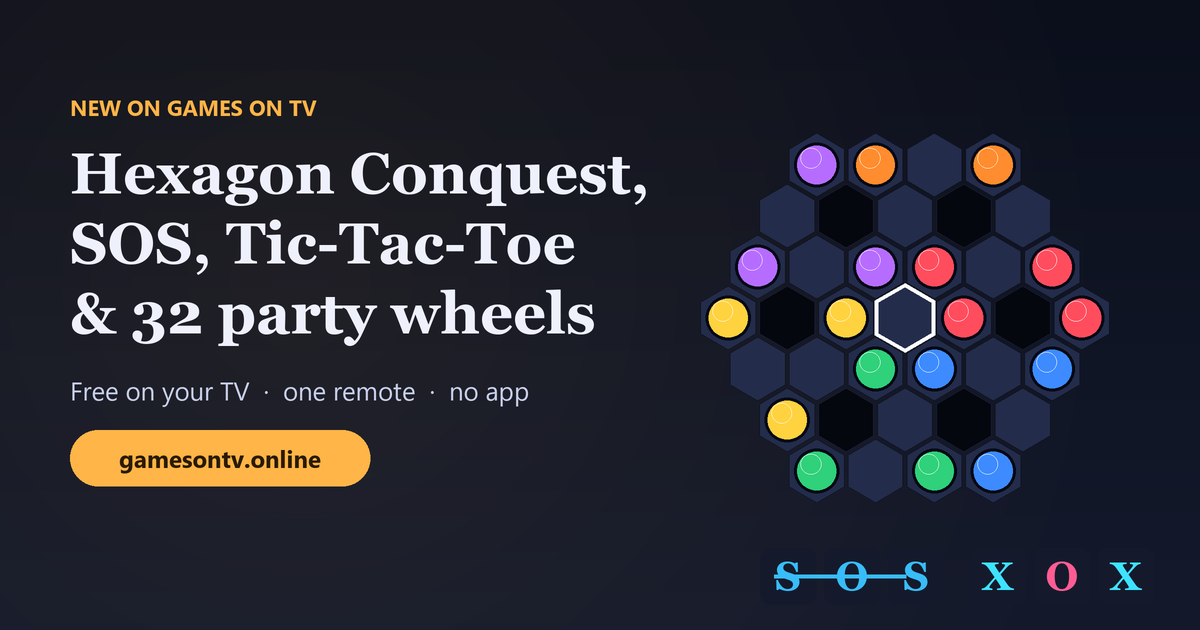
Quick answer: Games on TV has four new free games and a big upgrade to an old favourite. Hexagon Conquest is a Hexxagon-style strategy game for 2 to 6 players that everyone plays with one TV remote. SOS and Tic-Tac-Toe & Five in a Row now have computer opponents, so you can play them solo. Higher or Lower is a quick number-guessing game for 1 to 9 players. Spin the Wheel now comes with 32 ready-made wheels for parties, workouts, game nights and everyday decisions. Open gamesontv.online in your smart TV's browser to play. Everything is free, with no app, console or account.

What's new at a glance
| Game | Players | Play with | What's new |
|---|---|---|---|
| Hexagon Conquest | 1–6 (2–6 seats, humans or computers) | One shared TV remote | Brand-new strategy game with 4 maps, 3 sizes and 3 computer levels |
| Tic-Tac-Toe & Five in a Row | 1–2 | Remote, or two phones | New computer opponent (Easy or Hard), 3×3, 10×10 and 15×15 boards |
| SOS | 1–4 | Remote, or phones | New computer players (Easy or Hard), 5×5, 7×7 and 9×9 boards |
| Higher or Lower | 1–9 | Remote, or phones | New number-streak game with solo and party modes |
| Spin the Wheel | Any group | Remote | 32 ready-made wheels in 5 categories, plus longer option names |
Hexagon Conquest: Hexxagon for up to six players
Hexagon Conquest brings the classic Hexxagon (also known as Ataxx) to the living room. Each turn you move one of your pieces on a hexagon board, and every rival piece touching the cell you land on flips to your colour. That works against every opponent at once, so one good move can take pieces from three players.
- Grow: move to a free cell next to your piece. Your piece stays and a copy appears.
- Jump: move to a free cell two steps away. The piece leaves its old cell, so jumps open gaps.
- Capture: every touching enemy piece turns to your colour, whoever owns it.
- Win: when the board is full, one colour is left, or nobody can move, the player with the most pieces wins. Equal counts share the place.
Solo or multiplayer, set up in seconds
The first screen asks one question: Solo or Multiplayer. In Solo you pick 1 to 5 computer opponents. In Multiplayer you pick 2 to 6 people and can add computers to fill the empty seats. Every computer can be Easy, Medium or Hard. All the humans share one ordinary TV remote. When it's a new person's turn, the TV asks you to pass the remote, and computers take their turns by themselves.
Four maps, and the board grows with the table
| Map | What makes it different |
|---|---|
| Classic | The original hexagon with six blocked gaps |
| Crater | A hole punched through the middle, so the fight moves to the rim |
| Star | Six narrow arms: fast, close and aggressive |
| Honeycomb | Lots of small gaps, so jumping is everything |
The board gets bigger as more players join, and you can choose Small, Normal or Large on top of that. On the Classic map a two-player Small game has 31 cells, while six players on Large get 163. Every seat starts from a mirrored or rotated copy of the same position, so nobody begins with a better spot.
Tic-Tac-Toe & Five in a Row: now with a computer opponent
Tic-Tac-Toe & Five in a Row is two classics in one. Play the familiar 3×3 game, or Five in a Row (Gomoku) on a 10×10 or 15×15 board. You can now pick your opponent: the computer, a friend on the same remote, or two phones as controllers. On Hard, the computer plays perfect 3×3 Tic-Tac-Toe and blocks every open line in Five in a Row. Easy makes the mistakes a younger player can win against.
SOS: the letter game, now playable solo
SOS is the pencil-and-paper classic. Take turns writing S or O on the grid, and whenever you spell S-O-S in a straight line you score a point and play again. The board can be 5×5, 7×7 or 9×9. Choose 2 to 4 players and decide how many are computers. Set it to 1 human and 1 computer for a solo game. Hard computers grab every SOS they can and avoid leaving one for you.
Higher or Lower: one-button tension
Higher or Lower shows a number on the TV. Guess whether the next one will be higher or lower and keep your streak going. Play Solo to beat your personal best, or Party mode for 2 to 9 players taking turns, with 3, 5 or 10 attempts each. Choose a range of 1–10, 1–100 or 1–1000. On the remote, Up or Left means Higher and Down or Right means Lower.
Spin the Wheel: 32 ready-made wheels
Spin the Wheel now has a wheel picker. Press OK on the wheel name and browse 32 ready-made wheels in five categories, with a preview of every option before you load it.
- Party & family: Wheel of Chaos, Do It or Double It, Team Up or Betray, Don't Laugh Challenge, Who Is Most Likely To?, Five-Second Challenge, Mystery Punishment and Spin the Rule.
- Fitness & movement: Home Workout Roulette, Exercise Repetition Wheel, Workout Duration Wheel, Family Fitness Battle and Active Break Wheel.
- Game night: Wheel of Fortune Points, Quiz Category Roulette, Game Night Roulette, Lucky or Unlucky?, Handicap Wheel, Who Answers Next?, Random Object Challenge and Guessing Challenge Wheel.
- Everyday: What Should We Do Tonight?, Budget Adventure Wheel, Random Kindness Wheel and Dinner Challenge Wheel.
- Quick picks: dinner, activities, who goes first, yes or no, truth or dare and chores.
Long options such as "Double the previous amount" now wrap neatly onto two lines instead of being cut off, and your own options can be up to 28 characters long.
Smoother on the TV remote
Alongside the new games, we fixed a few things you will notice on the remote:
- Pressing Back opens the pause menu, and pressing Back again closes it in every new game.
- A single press of OK now does one thing. On a few game screens it could trigger twice.
- Game setup screens work entirely with the arrows and OK, with no pointer or touchscreen needed.
- Boards and menus fit a 720p TV screen without scrolling, even on the largest grids.
How to play the new games on your TV
- Open the web browser on your smart TV, Fire TV or Android TV box.
- Go to gamesontv.online and open All games.
- Choose Hexagon Conquest, SOS, Tic-Tac-Toe, Higher or Lower or Spin the Wheel and press OK on Play.
- Use the arrow buttons to move, OK to select and Back to cancel or pause.
- For phone play, scan the QR code on the TV. The controller opens in the phone's normal browser.
Key facts
- Price: free, with no account, no subscription and no in-app purchases.
- Devices: any smart TV or TV box with a web browser. A laptop connected to the TV works too.
- Controls: a standard TV remote (arrows, OK, Back). Some games can also use phones as controllers through a QR code.
- Hexagon Conquest: 2–6 seats, any mix of humans and computers, one shared remote, 4 maps, 3 sizes. gamesontv.online/games/hexagon-conquest
- Tic-Tac-Toe & Five in a Row: 1–2 players, computer Easy or Hard, 3×3, 10×10 or 15×15. gamesontv.online/games/tic-tac-toe
- SOS: 1–4 players, computer Easy or Hard, 5×5, 7×7 or 9×9. gamesontv.online/games/sos
- Higher or Lower: 1–9 players, solo or party mode. gamesontv.online/games/higher-or-lower
- Spin the Wheel: 32 ready-made wheels in 5 categories, or build your own. gamesontv.online/games/wheel
Frequently asked questions
What is Hexagon Conquest?
Can several people play Hexagon Conquest with one TV remote?
Can I play Tic-Tac-Toe or SOS against the computer on my TV?
What new wheels are in Spin the Wheel?
Do I need to download an app to play?
Are the new games free?
More from Games on TV
- Game night with friends: party games and challenges on your TV
- Free party games on TV with phones as controllers
- Play games on TV with just the remote
- Browse by type: board games, solo games, 2-player games and party games
Ready to play? Turn on the TV, open gamesontv.online and start with Hexagon Conquest.